8 Best GPS Dog Fences Without a Subscription (November 2026)
The best GPS dog fences without a subscription include the Dogtra GPS Fence for larger home properties, the Safehalo GPS wireless fence for 2 dogs for separate dog zones, and the VAQELI GPS wireless dog fence collar for phone-free yard setup.
On this page (8 sections)
- How we chose GPS dog fences without a subscription
- Compare no-subscription GPS dog fences
- The best GPS dog fences without a subscription
- How do you choose a no-subscription GPS dog fence?
- How should you set up and teach the boundary?
- What daily care and common mistakes matter most?
- What does “no subscription” leave out?
- Which GPS dog fence without a subscription should you choose?
The Dogtra GPS Fence is our top choice for a GPS dog fence without a subscription on open properties of at least 3/4 acre. It combines custom boundaries with a collar that works independently after app setup, plus a return sequence designed to guide your dog home.
Safehalo is the stronger match for two dogs needing separate activity areas. Choose a collar-controlled model if you want to set boundaries without downloading an app.
All 8 picks avoid monthly fence fees, but your yard and dog should decide the shortlist. A virtual boundary needs clear satellite reception, room for your dog to respond and consistent training.
If you're comparing containment methods, our GPS vs wireless dog fence guide explains the difference. For options beyond this fee-free shortlist, see our best GPS dog fences.
Our picks at a glance
-
1

-
2
 Best for separate dog zones
Safehalo GPS wireless fence for 2 dogs
7.7/10 our score
See it on Amazon -
3
 Best for phone-free yard setup
VAQELI GPS wireless dog fence collar
7.5/10 our score
See it on Amazon
- 4
 Check it
DOGOITM GPS wireless dog fence
Best for switching boundary layouts - 5
 Check it
Lilyeel GPS wireless dog fence collar
Best for larger dog households - 6
 Check it
Dwarfuarm GPS wireless fence collar
Best for first-time boundary training - 7
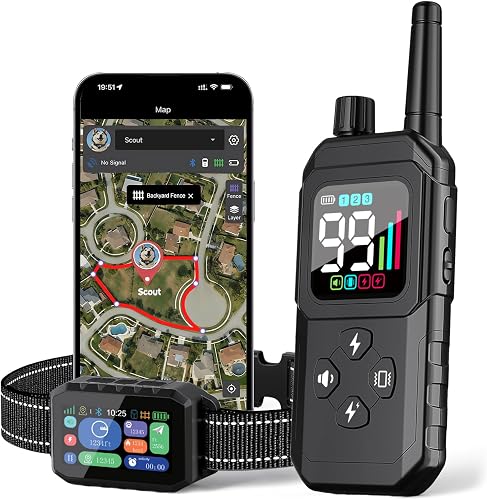 Check it
RAINLEOTI GPS wireless dog fence
Best for smaller eligible dogs - 8
 Check it
Dwarfuarm GPS wireless dog fence
Best for irregular open properties
How we chose GPS dog fences without a subscription
We prioritized usable boundaries, clear setup requirements and dog fit, then compared multi-dog controls, return behavior and charging needs. Removing a monthly bill only helps if the system suits the space where your dog will use it.
Battery runtimes are brand estimates, so plan charging around active fence use. We favor features that solve a clear problem, such as independent boundaries for two dogs or saved settings that reduce repeated setup.
Compare no-subscription GPS dog fences
Start with boundary shape and setup controls, then check the collar's fit. A large maximum range matters less than whether the safe area fits inside your property with room to spare.
| Product | Best for | Boundary setup | App | Dog fit | Our score |
|---|---|---|---|---|---|
| Dogtra GPS Fence | larger home properties | Circular or custom shaped | Setup only; collar works independently afterward | 15 lb and up; 10–30 in neck | 8.0 |
| Safehalo GPS wireless fence for 2 dogs | separate dog zones | Circular or 3–6-sided custom | Not required | 12–28 in neck; confirm minimum weight with Safehalo | 7.7 |
| VAQELI GPS wireless dog fence collar | phone-free yard setup | Circular or multi-point free-form | Not required | 7.5 | |
| DOGOITM GPS wireless dog fence | switching boundary layouts | Circular or six-point polygon | Not required | 15–120 lb; 10–28 in neck | 7.2 |
| Lilyeel GPS wireless dog fence collar | larger dog households | Custom polygon through app | Used for boundary and multi-pet controls | 7.0 | |
| Dwarfuarm GPS wireless fence collar | first-time boundary training | Circular; up to about 3,000 ft adjustable range | Not required | 15–110 lb; 9–26 in neck | 7.0 |
| RAINLEOTI GPS wireless dog fence | smaller eligible dogs | Custom polygon through app | Free app for setup and adjustments | 10–120 lb; 8–25 in neck | 6.9 |
| Dwarfuarm GPS wireless dog fence | irregular open properties | Circular or 3–16 point custom | Not required | 15–110 lb; 10–26 in neck | 6.8 |
The best GPS dog fences without a subscription
Dogtra leads for larger home properties, while the remaining picks serve more specific routines. Use the write-ups to identify the feature you need and the limitation that could rule each collar out.
Dogtra GPS Fence: Best for larger home properties
- No subscription fees
- Circular or custom boundaries
- App needed for setup only
- For dogs 15 lb and up
Dogtra suits open home properties where you want to draw the boundary on a phone, then let the collar run independently. Its return sequence stops correction when the dog heads back.
Pros
- Supports up to 30 unique fences
- Warning zone and backup fences
- Return reminder tone
Cons
- Designed for properties 3/4 acre or larger
- No live tracking or notifications
Dogtra suits someone who wants to draw a boundary on a phone, then leave the phone out of daily fence operation. It can store up to 30 unique fences, which helps if you use several suitable outdoor locations.
Its warning zone, primary fence and two backup fences provide layered boundary guidance. Dogtra says correction stops when the dog returns, while a continuous tone acts as a cue to come home.
The brand gives typical GPS accuracy as 3–15 ft, which makes room around the boundary essential. Its minimum property size leaves space between those zones so your dog can learn and respond.
Skip Dogtra for a compact yard or if escape notifications are a must. It has no live tracking or notifications, and the collar must come off indoors.
Dogtra recommends flag training, but flags are sold separately. Allow for that preparation before treating the fence as ready for daily use.
Safehalo GPS wireless fence for 2 dogs: Best for separate dog zones
- Two independent collars
- Circular or custom boundaries
- No app, Wi-Fi or cellular service
- Up to 48 hours per charge
Safehalo includes two collars that can use different boundaries and alert settings. It suits two-dog homes where sharing one activity area would be a compromise.
Pros
- Two collars included
- Separate fence memory for each collar
- Individual alert settings
Cons
- Conflicting minimum dog weights of 15 and 20 lb
- Very dense forests or deep canyons may affect signal
Safehalo is the most direct choice here for two dogs with different outdoor routines. Both collars are included, and changing one dog's fence or feedback does not change the other's settings.
Each collar can use a circle or a 3–6-sided custom boundary. That lets you give one dog a smaller activity area while allowing the other more space, provided both zones have suitable satellite reception.
Saved fences can restore when each collar powers on at the same location with Fence Memory enabled. Safehalo claims up to 48 hours per charge for each collar, so keep separate charging checks for both dogs.
Skip it if you want one phone screen for managing the pair. Everything is set through the individual collars.
Safehalo gives conflicting minimum weights of 15 and 20 lb, with an upper limit of 120 lb. Resolve that conflict with Safehalo before choosing it for a dog under 20 lb.
VAQELI GPS wireless dog fence collar: Best for phone-free yard setup
- No app or subscription
- Circular or free-form boundaries
- Up to 24 hours of use
- IPX7 waterproof
VAQELI lets you choose a circle or mark a free-form boundary directly through the collar. It suits buyers who want custom shaping without managing a phone app.
Pros
- Direct collar controls
- Circular and free-form modes
- Rechargeable and IPX7 waterproof
Cons
- Confirm dog weight and neck fit before ordering
- About 3 hours for a full charge
VAQELI suits buyers who want custom boundaries without phone setup. You can choose a circle or mark multiple GPS waypoints to make a free-form perimeter using the collar controls.
Its circular radius runs from 49–6,561 ft. Treat the minimum as a setup limit, not proof that a small property offers enough room for a useful boundary and a safe buffer.
VAQELI claims up to 24 hours of continuous operation, with about 3 hours for a full charge. A regular charging window matters if the collar will cover several outdoor sessions each day.
The collar has IPX7 waterproof protection for wet outdoor conditions. Keep charging contacts clean and dry before connecting power.
Choose it if avoiding an app is your main priority, but confirm dog weight and neck-fit limits before ordering. Skip it if you need those fit details settled before making your shortlist.
DOGOITM GPS wireless dog fence: Best for switching boundary layouts
- Circular and polygon modes
- No app or monthly fees
- Separate boundary mode memory
- Up to 50 hours use
DOGOITM keeps circular and polygon settings in separate memory. It suits buyers who want to switch between those layouts without overwriting the other mode.
Pros
- Separate memory for both modes
- Beep-only default setting
- Built-in step counter
Cons
- Polygon boundaries require six points
- Circular memory must be enabled
DOGOITM suits buyers who expect to switch between a circular zone and a polygon. The modes have separate memory, so moving between them does not erase the other layout.
Enable circular memory to retain the center point. Polygon settings save when you switch modes or power off, but saved coordinates still need checking before your dog uses the area again.
Polygon mode requires 6 points in order around a closed shape. For a rectangle, add midpoint markers along the sides; avoid crossing lines or figure-eight layouts.
The default warning is beep only. If vibration and static are enabled, static stops after 3 cycles while the other enabled alerts continue.
DOGOITM claims up to 50 hours of use per charge and includes a step counter. Choose it for saved layouts and fewer charging interruptions, but skip it if the required six-point setup feels needlessly complex for your yard.
Lilyeel GPS wireless dog fence collar: Best for larger dog households
- Free app with no subscription
- Custom polygon boundary
- App manages up to 5 collars
- Remote for initial training
Lilyeel brings compatible collars into one app for individual settings and activity information. Its included remote offers a separate way to introduce boundary cues.
Pros
- App supports up to 5 collar devices
- Individual alert adjustments
- Remote included for initial training
Cons
- Confirm dog weight and neck fit before ordering
- Not suitable for heavily wooded areas
Lilyeel suits households that want several compatible collars managed from one app. The free app supports up to 5 devices, with individual alert adjustments and daily activity information.
The included remote serves a different role from the app. It has two channels for training up to 2 dogs, and a second collar is required for the second dog.
Lilyeel recommends introducing cues with the remote before moving to independent GPS fence use. That helps separate learning what a sound or vibration means from learning where the boundary lies.
Its custom polygon suits an open yard where a circle would waste usable space. Skip it for heavily wooded areas or if you want to avoid phone-based boundary controls.
Confirm the collar's weight and neck-fit limits before choosing it. App capacity alone should not decide a multi-dog purchase, because every dog still needs a suitable collar and its own training pace.
Dwarfuarm GPS wireless fence collar: Best for first-time boundary training
- Circular virtual boundary
- No app, SIM or subscription
- Includes flags and a 14-day training guide
- For dogs 15–110 lb
This circular-only Dwarfuarm model includes flags and a guide for introducing the boundary. It suits an open yard where a round activity area fits comfortably.
Pros
- Includes 10 boundary flags
- 14-day training guide included
- Short and long contact points included
Cons
- Circular boundary only
- Not recommended for dense trees or weak GPS areas
This Dwarfuarm model suits a first-time buyer with an open area that comfortably fits a circle. It includes 10 boundary flags and a 14-day guide, giving you physical markers and a training sequence to follow.
The collar's warning zone sits about 9 ft inside the boundary. Beeping begins there, giving your dog a cue to turn back before entering the correction zone.
You can choose beep with vibration or beep with static. Automatic mode increases through levels 1–5, while fixed mode lets you select a level; a protection pause follows every 5 corrections.
Those pauses limit repeated correction, but they do not replace supervision or teach the boundary on their own. Use the flags to reward a return toward the safe area.
Skip this model for a long, narrow or irregular yard. Its circular-only layout is a useful simplification only when the shape actually fits.
RAINLEOTI GPS wireless dog fence: Best for smaller eligible dogs
- Free app with no monthly fees
- Custom polygon boundary
- Remote control included
- For dogs 10–120 lb
RAINLEOTI has a lower stated minimum dog weight than the other picks with published fit ranges. It combines phone settings with a handheld training remote.
Pros
- App supports up to 5 pet devices
- Vibration warning before the boundary
- Remote control included
Cons
- App connection is limited to about 100 ft
- About 20 hours of active GPS use
RAINLEOTI is worth considering for a dog below the 15 lb minimum common among the other picks. Its stated fit is 10–120 lb with an 8–25 in neck, though collar comfort still needs a close check.
The app handles settings, and an included handheld remote supports training. The app connects within about 100 ft; RAINLEOTI claims up to 1,640 ft for remote control, which is a separate range from the fence boundary.
A vibration pre-warning starts about 15 ft before the edge. Leave enough usable space inside that warning area rather than placing the boundary tight against a road or building.
Plan around the brand's about 20 hours of active GPS use, not its 60-day standby figure. Recharge takes 2–3 hours.
Choose it for a smaller eligible dog and combined phone and remote controls. Skip it if you need distant phone access or expect the fence to work under roofs.
Dwarfuarm GPS wireless dog fence: Best for irregular open properties
- Circular and custom multi-point modes
- No app or subscription
- IPX7 waterproof
- For dogs 15–110 lb
This Dwarfuarm model lets you mark more corners than a simple polygon system. It suits open properties that need several changes of direction along the boundary.
Pros
- Custom boundary with up to 16 points
- Vibration and static can be turned off
- Magnetic charging
Cons
- Dense woods and tall buildings can weaken GPS
- Adjacent custom points must be at least 16 ft apart
The second Dwarfuarm model suits an open property with several corners. Its custom mode supports 3–16 points, giving more layout flexibility than a fixed six-point polygon.
Adjacent points must be at least 16 ft apart. That spacing makes it better suited to broad changes of direction than close tracing around tight garden beds or narrow passages.
Dwarfuarm recommends waiting for full GPS signal bars, then allowing about 3 more minutes before setup. Take that pause before placing points so the boundary begins with a settled satellite connection.
Beep, vibration and adjustable static are available, and vibration or static can be turned off. Magnetic charging takes about 2 hours for a full charge.
Choose it when several boundary corners matter more than app controls. Skip it if dense trees or buildings surround the intended perimeter, since adding more points cannot solve weak reception.
How do you choose a no-subscription GPS dog fence?
Choose by usable yard space, dog fit and daily controls, in that order. A collar with more modes cannot make an unsuitable property work.
Does the boundary shape leave enough safe space?
A circle works best when you can place its center away from hazards and keep the whole zone inside your property. Picture the full circle before buying, including the side behind the center point.
A custom perimeter helps with angled edges or an elongated yard. It does not automatically create separate exclusion areas around a pool, garden or driveway, so do not assume that feature comes with custom shaping.
Leave a buffer between the virtual edge and roads, neighboring land or water. Position changes and a moving dog's response both need room; a GPS line is not a precise physical fence line.
Which controls suit your no-subscription GPS dog fence?
App setup suits buyers who prefer drawing and reviewing a boundary on a screen. Direct collar controls suit those who want fewer phone tasks, though working through buttons may take more attention during setup.
Think about who will use the system each day. A second caregiver should know how to power it on, recognize readiness, check the saved boundary and identify a low battery.
For several dogs, separate the number of collars included from the number supported. App capacity or remote channels do not mean that every required collar comes in the box.
Does the collar fit beyond the weight range?
Measure your dog's neck and check both limits. A dog can meet the minimum weight while still having a neck or build that makes the receiver awkward.
Follow the manual for receiver position, strap tension and contact-point choice. Do not tighten the strap excessively to compensate for thick fur or an uncertain response.
For a dog near the minimum size, compare receiver bulk and fit before focusing on range. Our guide to wireless dog fences for small dogs explains the fit questions to settle first.
Is GPS the right boundary method?
GPS suits open outdoor areas where you can leave space around the perimeter. Dense cover, narrow side yards and boundaries close to buildings are reasons to consider another approach.
A virtual fence also cannot keep other animals or people out. For a dog that charges roads, panics at alerts or repeatedly runs through boundaries, prioritize a physical enclosure and supervised outings.
Our GPS fence guide for wooded areas covers reception concerns. If the property itself is the problem, compare the options in how to choose wireless, GPS or wired fencing.
How should you set up and teach the boundary?
Set up the empty boundary first, then teach your dog with a leash and rewards. A successful satellite connection does not mean your dog understands the safe area.
Prepare the collar and map the space
Fully charge the collar and read the instructions before taking it outside. For app-based setup, finish the required phone permissions and connections while you can focus on them.
Walk the intended perimeter and identify roads, gates, roof cover and dense trees. Move the virtual edge inward where needed, even if that leaves part of your land outside the activity area.
Let the collar acquire satellites in an open location before saving the center or corners. Follow the model's waiting steps rather than placing boundary points while the position is still settling.
Check the boundary before putting it on your dog
Follow the manual's boundary-check procedure with the collar off your dog. Walk slowly toward several edges and corners, noting where warnings begin and whether the safe area matches your plan.
Check different approaches rather than only walking straight out from the center. Stop if alerts appear inconsistent, and resolve signal, setup or saved-location problems before involving your dog.
Teach a turn back toward the safe area
Use flags where recommended and keep early sessions short. With your dog leashed, introduce the boundary cues and reward turning back toward you and the safe area.
Start with the least intrusive suitable setting allowed by the instructions. Increasing correction to overcome confusion can make the dog fear the yard without teaching a clear return behavior.
Build gradually from quiet practice to supervised distractions. A dog that turns back during a calm session still needs help learning the same response around squirrels, visitors or another dog.
Recheck after travel or layout changes
Stored coordinates are tied to a location. At a campsite or another property, create or confirm the correct boundary before putting the collar into use.
Moving the edge also changes what your dog has learned. Reposition markers and repeat guided practice instead of expecting an old boundary lesson to transfer immediately.
What daily care and common mistakes matter most?
Check power, fit and boundary readiness before each outing. These simple checks matter more than choosing the largest advertised range.
Charge for active use, not standby
Build charging into a routine when your dog is indoors without the collar. Keep a leash or physical enclosure available while the receiver is charging.
Long battery estimates do not mean you should wait for the collar to stop working. Check its charge before use, especially after storage, travel or a longer outdoor session.
Keep the collar clean and comfortable
Remove dirt from the strap and receiver, and dry the collar as directed before charging. Waterproof protection does not remove the need to care for ports, covers and contacts.
Check the skin beneath the receiver and follow the manual's wear limits. Remove the collar if you notice rubbing or irritation, and resolve fit problems before using it again.
Do not use stronger alerts to fix weak GPS
Unexpected warnings call for a signal and boundary check first. Raising intensity will not correct a misplaced center point, crossing polygon lines or poor satellite reception.
Likewise, do not shrink the buffer just because a custom boundary can follow your property edge. Use a simpler, roomier zone if it gives your dog clearer guidance.
Keep supervision separate from automation
A fence collar gives cues; it does not physically stop a dog. Stay nearby while your dog learns and avoid treating a protection pause as evidence that an escape cannot happen.
Keep identification current and have a plan for getting your dog back. Containment and recovery solve different problems, even when both use GPS.
What does “no subscription” leave out?
No subscription removes the recurring fence-service fee, not every equipment need or limitation. You may still need additional compatible collars, training flags or another way to locate a dog beyond the property.
A free app also does not mean unlimited-distance phone access. Boundary operation, nearby controls, activity history and live location sharing are separate features.
Dogtra explicitly excludes live tracking and notifications. Do not assume any other fence provides remote recovery features simply because it uses satellite positioning or shows activity information.
Read whether GPS dog fences need a monthly plan for the service distinction. Our Halo subscription guide and Fi subscription guide explain recurring services for those separate products.
Which GPS dog fence without a subscription should you choose?
Choose Dogtra for a roomy home property, custom setup and return guidance. Choose Safehalo when two dogs need independent boundaries and individual settings.
For phone-free controls, VAQELI suits custom shaping, DOGOITM suits switching saved layouts, and the multi-point Dwarfuarm suits an open perimeter with several corners. The circular Dwarfuarm is the simpler match when a round zone fits.
Choose Lilyeel for app management across a larger dog household, or consider RAINLEOTI for a smaller eligible dog needing app and remote controls. Confirm fit before letting either app features or capacity decide.
The right GPS dog fence without a subscription should leave your dog a clear, roomy safe area and fit a routine you can maintain. Before buying, use our GPS fence guide for wooded areas to rule out reception problems on your property.
Our top 3 picks at a glance
-
1
-
2
Best for separate dog zones
Safehalo GPS wireless fence for 2 dogs
7.7/10 our score
See it on Amazon -
3
Best for phone-free yard setup
VAQELI GPS wireless dog fence collar
7.5/10 our score
See it on Amazon
Frequently asked questions
Can a GPS dog fence work without a subscription?
Yes, a GPS dog fence can use satellite positioning without a monthly service plan; all models here have no subscription fees, but their controls differ: some use a free phone app, while others use collar controls. Choose by boundary shape, dog fit and training needs before comparing extra features.
Do no-subscription GPS dog fences need cell service?
Several models here work without cellular service, including Safehalo and VAQELI; Dogtra uses an app during setup, then its collar runs independently without a phone connection. Satellite positioning and phone location updates are different functions, so check communication needs separately if you also want to follow a missing dog.
Will these GPS fences work under trees or near buildings?
Dense trees and nearby buildings can weaken GPS reception and affect boundary accuracy; choose an open outdoor area, and leave room between the virtual edge and hazards. Read our guide to GPS dog fences in wooded areas before choosing a system for a shaded yard or property with uneven terrain.
Does a GPS fence track a dog after it leaves the yard?
A GPS fence does not automatically include live tracking after a dog leaves the yard; Dogtra has no live tracking or notifications, though its app can show route and distance history after use. For the communication side, see how dog GPS trackers work without cell service.


