9 Best GPS Dog Fences (November 2026)
The best best GPS dog fences include the Halo Collar 5 GPS dog fence for live location alerts, the Dogtra GPS Fence for open acreage, and the Safehalo GPS wireless fence for 2 dogs for separate dog zones.
On this page (7 sections)
- How we chose the best GPS dog fences
- GPS dog fence features compared
- GPS dog fence picks for different yards and dogs
- How to choose a GPS fence that fits your property
- How to set up and teach a GPS fence boundary
- Charging, care and mistakes that weaken a GPS fence
- Which best GPS dog fence fits your next step?
The best GPS dog fence for containment and live tracking is Halo Collar 5. Choose Dogtra for outdoor containment without a monthly plan, or Safehalo if two dogs need separate boundaries.
Your yard comes first: clear satellite reception, usable space and room to retreat from warnings matter more than a long feature list. A virtual fence guides a trained dog, but it isn't a physical barrier and won't keep other animals or people out.
For the wider options, read our complete guide to wireless and GPS dog fences. Our GPS vs wireless dog fence comparison helps if you're still choosing the technology.
Our picks at a glance
-
1

-
2

-
3
 Best for separate dog zones
Safehalo GPS wireless fence for 2 dogs
7.7/10 our score
See it on Amazon
- 4
 Check it
VAQELI GPS wireless dog fence collar
Best for phone-free setup - 5
 Check it
PetSafe Guardian GPS dog fence, 3/4 acre+
Best for staying at home - 6
 Check it
DOGOITM GPS wireless dog fence
Best for longer outdoor outings - 7
 Check it
Lilyeel GPS wireless dog fence collar
Best for app-managed households - 8
 Check it
PetSafe Guardian GPS 2.0 fence and tracker
Best for frequent location changes - 9
 Check it
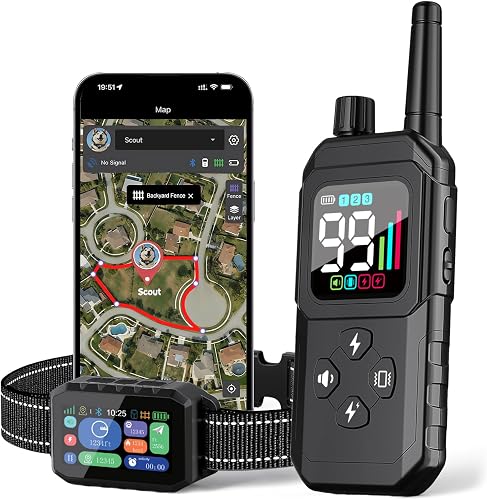
RAINLEOTI GPS wireless dog fence
Best for remote-led training
How we chose the best GPS dog fences
We compared boundary controls, tracking, collar fit and service requirements to match each fence with a clear buyer need. Scores reflect those features and limits, with Halo leading for buyers who want both containment and live location updates.
We gave each alternative a specific role rather than treating every collar as interchangeable. A fence that works independently after setup serves a different household from one built around phone controls, alerts and a paid plan.
GPS dog fence features compared
Compare tracking, subscriptions and setup method first. Then check property requirements and collar fit, because neither extra range nor more feedback levels can make an unsuitable system fit your yard or dog.
| Product | Best for | Tracking | Plan | Fence setup | Our score |
|---|---|---|---|---|---|
| Halo Collar 5 GPS dog fence | live location alerts | AlwaysOn GPS with alerts | Membership required | Multiple stored fences | 8.2 |
| Dogtra GPS Fence | open acreage | No live tracking or notifications | No monthly fees | 8.0 | |
| Safehalo GPS wireless fence for 2 dogs | separate dog zones | No subscription | 7.7 | ||
| VAQELI GPS wireless dog fence collar | phone-free setup | No subscription | 7.5 | ||
| PetSafe Guardian GPS dog fence, 3/4 acre+ | staying at home | No subscription fee | 7.4 | ||
| DOGOITM GPS wireless dog fence | longer outdoor outings | No monthly fee | 7.2 | ||
| Lilyeel GPS wireless dog fence collar | app-managed households | No subscription | 7.0 | ||
| PetSafe Guardian GPS 2.0 fence and tracker | frequent location changes | Real-time tracking and push notifications | Subscription required for each pet | 7.0 | |
| RAINLEOTI GPS wireless dog fence | remote-led training | No subscription fee | 6.9 |
GPS dog fence picks for different yards and dogs
Choose Halo for tracking, Dogtra for containment without a plan, and Safehalo for separate two-dog zones. The remaining picks offer different controls, charging routines and home or travel uses.
Halo Collar 5 GPS dog fence: Best for live location alerts
- GPS fence and live tracking
- Membership required
- Multiple stored fences
- Sound, vibration and optional static feedback
Choose Halo for boundary guidance, live location updates and smartphone alerts in one collar. Plan for a membership and nightly charging.
Pros
- Fence and tracking in one collar
- Stores multiple fences
- Training guidance included
Cons
- Membership required for GPS and fence features
- Halo recommends charging nightly
Halo suits owners who want to know where their dog is as well as teach a boundary. Its AlwaysOn GPS, approach and crossing alerts, and activity reports bring those jobs into one collar.
Halo says Precision+ combines dual-frequency L1 and L5 satellites with real-time ground-station corrections for accuracy within 2 feet. That claim doesn't make a boundary beside a road suitable; leave room for warnings and your dog's response.
Multiple stored fences help when you use more than one outdoor location. Included training guidance covers sound, vibration and optional static feedback, so build that learning time into your plans before allowing more freedom.
Skip Halo if you want no recurring plan or cannot charge nightly. Membership activates GPS and fencing, making it part of the system rather than an optional extra; our Halo Collar subscription guide explains what to check.
Dogtra GPS Fence: Best for open acreage
- No subscription
- Circular or custom boundaries
- Layered boundary zones
- Outdoor properties 3/4 acre or larger
Dogtra suits owners with room for layered boundary zones who want containment without a monthly fee. Its collar works independently after app setup.
Pros
- No subscription fees
- Phone connection not needed after setup
- Return reminder tone
Cons
- No live tracking or notifications
- Outdoor use only on suitable larger properties
Dogtra suits owners with open acreage who want containment without phone dependence during use. The app creates circular or custom boundaries, then the collar operates independently without a phone connection.
Its warning zone, primary fence and two backup fences need room. Dogtra specifies outdoor properties of at least 3/4 acre and explains that smaller areas can compress the zones, leaving less space for a dog to respond.
The return sequence disables correction as the dog comes back and uses a reminder tone to guide the return. Flag training is recommended, flags are sold separately, and the collar should come off indoors.
Skip Dogtra if escape alerts or live location updates are essential. Movement history after use isn't live tracking; compare the best GPS dog collars if finding a dog is your main concern.
Safehalo GPS wireless fence for 2 dogs: Best for separate dog zones
- Two independent collars
- Separate fence settings
- No subscription or app
- Circular or custom boundary per collar
Safehalo includes two complete collar-based fence systems. Each dog can have its own boundary and feedback settings without changing the other dog's setup.
Pros
- Two independent fence systems
- Different boundaries for each dog
- No app, Wi-Fi or cellular service required
Cons
- Needs clear outdoor satellite reception
- Confirm minimum weight for dogs near 15–20 lb
Safehalo makes sense when two dogs need different outdoor zones or feedback settings. Each included collar is a complete fence system, so adjusting one dog's boundary doesn't change the other's.
Each can use a circular boundary or a custom shape with 3–6 sides. Saved fence memory can restore the last boundary when the collar starts again at the same location, reducing repeated setup.
All controls are on the collars, with no app, base station or service connection required. That suits owners comfortable managing two devices separately; it is less appealing if you want one phone screen for every adjustment.
Safehalo claims up to 48 hours per charge, but gives conflicting minimum dog weights of 15 and 20 lb. Confirm suitability for a dog near that range, and choose another approach if clear outdoor satellite reception is unavailable.
VAQELI GPS wireless dog fence collar: Best for phone-free setup
- Circular and custom fence modes
- No app or subscription
- IPX7 waterproof
- Up to 24 hours of working time
VAQELI suits owners who prefer setting boundaries directly on a collar. Its circular and custom modes avoid the need for a phone app.
Pros
- Two fence modes
- No recurring fee
- No Wi-Fi or cellular data needed
Cons
- Boundary changes use collar controls
- Daily use needs a regular charging routine
VAQELI suits owners who want boundary setup without downloading or managing an app. Circular mode has a 49–6,561 ft radius, while free-form mode uses GPS waypoints to shape an irregular boundary.
Use the circle for a broad, open area where its entire edge stays inside suitable ground. Choose custom mode when a circle would include a driveway, neighboring land or another area your dog shouldn't enter.
The collar has IPX7 protection, and VAQELI claims up to 24 hours of continuous working time. A full charge takes 3 hours using a 5 V input, so give charging a regular place in your daily routine.
Skip VAQELI if you want phone-based boundary editing. Before buying, confirm the collar's fit for your dog; fence modes and range alone don't answer that question, especially for a smaller dog.
PetSafe Guardian GPS dog fence, 3/4 acre+: Best for staying at home
- Properties 3/4 acre or larger
- No subscription fee
- My PetSafe app notifications
- Up to 5 days of battery life
This Guardian model suits a fixed home boundary with app settings and notifications. It has no subscription, tracking or portability.
Pros
- No subscription fee
- App setup and notifications
- Long claimed runtime between charges
Cons
- No tracking or portability
- Requires a larger property and dog
The original PetSafe Guardian GPS suits a fixed home boundary with app controls and no subscription. It offers battery monitoring, collar adjustments and notifications through My PetSafe, without live tracking or portability.
This model needs a property of at least 3/4 acre and a dog over 25 lb. Its neck range is 13–28 in, so measure before choosing it for a dog close to either fit limit.
PetSafe claims up to 5 days per charge, which may suit owners who want fewer charging sessions. The waterproof collar offers tone and vibration or 10 static levels, with settings controlled through the app.
Skip this Guardian for camping or finding an escaped dog. Its home-focused design is the reason to choose it, and app notifications shouldn't be confused with a live map showing your dog's position.
DOGOITM GPS wireless dog fence: Best for longer outdoor outings
- Circular and polygon fence modes
- No app or subscription
- IPX7 waterproof
- Up to 50 hours of continuous use
DOGOITM combines longer claimed runtime with separate saved settings for circular and polygon boundaries. Setup happens on the collar.
Pros
- Up to 50 hours of use per charge
- Separate memory for each boundary mode
- No app download required
Cons
- Needs suitable outdoor GPS reception
- Polygon boundaries require six points
DOGOITM suits owners who value saved boundary modes and longer claimed runtime. It offers up to 50 hours of continuous use, collar-based controls and separate memory for circular and polygon settings.
Its polygon mode requires six points joined in order into a closed shape. For a four-corner area, add two points along the edges; don't cross the lines or create a figure-eight boundary.
The circular center needs its memory function enabled to save it. Learn that step before relying on a stored fence, because switching on a collar and restoring the intended boundary aren't always the same action.
Skip DOGOITM if you want app-based map editing or dislike point-by-point setup. Its step counter adds activity information, but the buying decision should rest on boundary setup, fit and your ability to check the saved settings.
Lilyeel GPS wireless dog fence collar: Best for app-managed households
- Custom polygon boundary in app
- No monthly fee
- App manages up to 5 collars
- Remote for initial training
Lilyeel suits households that want one app for several compatible collars. An included remote helps introduce boundary cues before independent fence use.
Pros
- App can manage up to 5 collars
- No monthly fee
- Remote included for initial training
Cons
- Not for indoor use or heavily wooded areas
- Additional collars needed for more dogs
Lilyeel suits households that want one app to manage several compatible collars. The free app supports up to 5 devices, individual feedback adjustments and custom polygon boundaries.
The included remote has two channels and can be used with two dogs when a second collar is added. That differs from the app's device capacity, so don't assume the remote controls all five collars.
Lilyeel recommends introducing cues with the remote before independent GPS fence use. Teach the dog to turn back or return to the safe area rather than simply reacting to a sound.
Skip Lilyeel for indoor use or heavily wooded ground. It needs stable outdoor GPS reception; our guide to GPS fences in wooded areas helps assess a shaded property before you commit to a boundary.
PetSafe Guardian GPS 2.0 fence and tracker: Best for frequent location changes
- Fence and real-time tracking
- Up to 50 custom fences
- Subscription required
- Properties 1/2 acre or larger
Guardian GPS 2.0 suits owners who need tracking and saved boundaries for several locations. Setup needs Wi-Fi, and tracking and push notifications need cellular service.
Pros
- Fence and tracking features
- Stores up to 50 custom fences
- Collar adjusts to necks as small as 8 in
Cons
- Subscription required for each pet
- Cellular service needed for tracking and notifications
PetSafe Guardian GPS 2.0 suits owners who want tracking and saved fences for multiple locations. It stores up to 50 custom boundaries, rather than focusing only on a fixed home setup.
Setup needs a 2.4 GHz Wi-Fi connection. Cellular service is required for tracking and push notifications, while PetSafe says the GPS fence remains active without it, a distinction that matters at remote destinations.
The collar adjusts to necks as small as 8 in, and the system is intended for properties of at least 1/2 acre. Measure your dog and check the usable space at each destination rather than relying on the collar's compact design.
Skip it if per-pet subscriptions don't fit your plans. Every dog needs a collar and subscription; our GPS fence subscription guide helps you compare that commitment with containment-only options.
RAINLEOTI GPS wireless dog fence: Best for remote-led training
- App and remote control
- No monthly subscription
- IP67 waterproof
- About 20 hours of active GPS use
RAINLEOTI pairs app boundary settings with a separate training remote. It suits open outdoor spaces and owners who can recharge around daily use.
Pros
- App and remote control
- No monthly fee
- App can manage up to 5 pet devices
Cons
- Avoid indoor use and dense tree cover
- About 20 hours of active GPS use
RAINLEOTI suits owners who want a handheld training remote alongside app controls. The remote's stated range reaches 1,640 ft, while the app connects within about 100 ft for setup and adjustments.
Those control distances serve different jobs; neither should be read as a promise of remote live tracking. The app can manage up to 5 compatible devices and adjust individual feedback settings.
RAINLEOTI describes a vibration pre-warning about 15 ft before the boundary. Allow space for that warning inside your chosen area, and avoid roofs, buildings and dense trees that can interfere with reception.
Plan around about 20 hours of active GPS use, rather than the much longer standby figure. Skip it if daily charging is impractical or you need a boundary under cover; its stated fit is 10–120 lb with an 8–25 in neck.
How to choose a GPS fence that fits your property
Choose a GPS fence only when the usable outdoor area leaves room for a clear boundary and a calm return. Total acreage, maximum radius and a custom drawing tool don't tell you how much suitable space remains.
Match the best GPS dog fence to usable space
Sketch your property and mark roads, driveways, buildings, pools and places with heavy tree cover. Draw the proposed fence farther inside those limits so a warning doesn't first arrive at a hazard.
A long, narrow yard can be harder to fit than a broad yard of similar area. Warning zones consume part of the space, and your dog needs somewhere clear to turn back without approaching another boundary.
A circular fence includes everything inside its radius, including land you may want excluded. A custom polygon can follow a property more closely, but don't assume it supports holes around gardens or pools.
Where a boundary must follow a tight edge, compare GPS and buried-wire dog fences. A physical fence may be more suitable where crossing even briefly would expose your dog to traffic.
Separate containment, tracking and phone controls
GPS positioning doesn't automatically mean live tracking. A collar can use satellites to judge its position against a fence without sending that position to your phone.
Likewise, an app may serve only for setup, nearby adjustments or activity information. Decide whether you need boundary guidance, crossing notifications or a live location map, then choose a system that expressly includes that function.
For rural use, check the connection needed for each job at the actual location. A fence can remain active while remote alerts are unavailable, so don't make a weak cellular connection part of your escape-response plan.
Check fit before feedback levels
Measure neck size as well as body weight. A dog can meet a weight requirement and still fall outside a collar's adjustment range.
Follow the model's fit instructions and check how the device sits when your dog lowers its head or turns. More feedback levels won't fix a slipping collar, poor contact or a dog that hasn't learned what the cue means.
If your dog panics, freezes or tries to bolt during training, stop the session. Seek help from a qualified trainer before increasing intensity or allowing more freedom.
Choose controls your household will actually use
Choose the setup method that your regular caregiver can manage. A phone map may make a custom boundary easier to understand, while collar controls avoid relying on an app for adjustments.
For several dogs, separate three questions: how many collars are included, how many the app supports and whether each dog can have a different boundary. Those are different capabilities, and extra device capacity doesn't mean extra collars come in the box.
How to set up and teach a GPS fence boundary
Start with a charged collar, clear outdoor reception and supervised training. Creating a virtual line is only the setup step; your dog must learn the cue and the route back to the safe area.
Establish the boundary before involving your dog
Read the instructions, finish any required activation and install applicable firmware updates. Take the collar outdoors and allow it to obtain a satellite fix before saving the fence.
Follow the model's boundary-check procedure with the collar off your dog. Check corners and edges near buildings, and keep your dog secured elsewhere while you confirm that the intended safe area is correctly saved.
If the fence shifts or warnings appear in the wrong place, pause use and resolve the setup or reception problem. Moving the boundary inward can create more room, but it doesn't cure unreliable reception.
Teach a turn back, then practice it
Use visible markers where the training guide recommends them. Keep early sessions short and use a leash so you can guide your dog back and reward the return.
Begin with the cues and sequence recommended for that model. The lesson is that a warning means move toward the safe area, not that the collar signals something frightening without a clear response.
Practice at several parts of the boundary before adding distractions. A dog that responds calmly during a quiet session may still chase an animal, so continue supervision as freedom increases.
Recheck every new location
A saved fence still needs a location check. Confirm the correct profile or center point before each use, especially after travel, a reset or a change between boundary modes.
At a campsite or temporary property, check access roads and neighboring spaces before creating the zone. Teach the new limits rather than expecting your dog to understand them because the collar is familiar.
Charging, care and mistakes that weaken a GPS fence
Build battery checks, fit checks and boundary checks into your outdoor routine. These small tasks matter more than stretching a claimed runtime to its limit.
Charge for active use, not standby
Use active GPS runtime to plan charging, and treat “up to” figures as ceilings rather than a schedule you must reach. Keep enough charge in reserve for the whole planned outing.
After wet or muddy use, clean and dry the collar as directed before charging. Keep charging covers secure, use the specified power input and follow each model's water-use instructions rather than assuming waterproof means every activity is allowed.
Check the collar and your dog's skin
Inspect the strap, closure and contact areas regularly, and remove the device as its instructions require. Check your dog's neck for rubbing or irritation, especially when first establishing a routine.
Don't leave an outdoor GPS fence active indoors unless the model expressly allows it. Walls and roofs can disrupt positioning, and Dogtra specifically instructs owners to remove its collar inside.
Avoid these common buying and use errors
- Drawing the fence at the property edge: leave space between the warning area and roads, neighboring land or other hazards.
- Choosing by maximum range: usable shape, reception and the dog's response space matter more than a large distance figure.
- Skipping training: automatic feedback can't teach the return route without clear practice.
- Using stronger correction to solve setup errors: address reception, boundary position and fit first.
- Confusing standby with working time: plan around active use and check battery status before release.
- Assuming two dogs learn together: train each dog separately and check its own collar settings.
- Treating containment as escape recovery: keep identification current and decide how you'll retrieve your dog if it leaves.
For more on the limits of virtual containment, read how GPS dog fences work in daily use. Make the decision before relying on the collar around distractions or open access to a road.
Which best GPS dog fence fits your next step?
Choose Halo Collar 5 when live location updates and boundary alerts justify a membership and nightly charging. Choose Dogtra for a roomy outdoor property where containment matters more than tracking.
Pick Safehalo when two dogs need independent zones, or the original PetSafe Guardian for a fixed home setup with app controls. Consider Guardian GPS 2.0 for saved fences at several locations when you can meet its setup and service requirements.
For the best GPS dog fence without recurring fees, narrow the choice by controls: collar-based setup or phone-based management. Then check our GPS dog fences without a subscription guide, measure your dog and map the usable boundary before ordering.
Our top 3 picks at a glance
-
1
-
2
-
3
Best for separate dog zones
Safehalo GPS wireless fence for 2 dogs
7.7/10 our score
See it on Amazon
Frequently asked questions
What is the best GPS dog fence?
The best GPS dog fence for containment and live tracking is Halo Collar 5. Choose Dogtra if you want containment without a monthly plan and have enough open outdoor space.
Safehalo is worth considering for two dogs that need separate zones.
Start with property suitability and collar fit before comparing extras.
Do GPS dog fences need a subscription?
Some GPS dog fences require a subscription, but many containment systems have no monthly fee. Halo Collar 5 and PetSafe Guardian GPS 2.0 need plans; Dogtra, Safehalo and VAQELI do not.
Our guide to GPS dog fences without a subscription explains the tradeoffs between controls, containment and tracking.
Can a GPS dog fence work in a small yard?
A GPS dog fence needs enough usable space for its boundary and warning zones. Dogtra and the original PetSafe Guardian specify at least 3/4 acre, while Guardian GPS 2.0 specifies 1/2 acre.
A small adjustable radius on another system doesn't prove it suits a narrow yard beside roads or buildings.
Will a GPS dog fence work under trees?
Light tree cover and dense woods create different conditions, so judge the actual boundary area. Heavy cover can weaken or disrupt satellite reception; Lilyeel excludes heavily wooded areas, and RAINLEOTI advises avoiding them.
Read how GPS dog fences work in wooded areas before choosing a system for a shaded property.
Does a GPS dog fence track a dog after it leaves?
Only a fence with live tracking can provide ongoing location updates after an escape. Halo Collar 5 and PetSafe Guardian GPS 2.0 include tracking with required plans; Dogtra has no live tracking or notifications.
For Guardian GPS 2.0, cellular service is needed for tracking and push notifications, even though fencing remains active.


